
Memory Cards
Memory cards are small, portable storage cards used to save photos, videos, music, apps and other files. They are commonly used in digital cameras, action cameras, drones, smartphones, tablets, games consoles and laptops with a card reader.
Memory cards are available in different types, capacities and speed ratings. Choosing the right card depends on the device you are using, the type of files you want to store and whether you need to record high-resolution photos or video.
Best Selling Memory Cards

Types of Memory Cards
SD Cards
SD cards, or Secure Digital cards, are the standard memory card size used in many digital cameras, camcorders, laptops and card readers. They are larger than microSD cards and are easy to handle and insert into compatible devices.
SD cards are a popular choice for cameras, camcorders and other devices with a full-size SD card slot. They are available in a wide range of capacities and speed ratings.
SDHC Cards
SDHC stands for Secure Digital High Capacity. These cards offer more storage than older standard SD cards, with capacities from more than 2GB up to 32GB.
An SDHC card can be a good option for older cameras, camcorders and devices that do not support higher-capacity SDXC cards. Before buying, check that your device supports SDHC cards.
SDXC Cards
SDXC stands for Secure Digital Extended Capacity. These cards offer larger storage capacities, from more than 32GB up to 2TB, making them suitable for high-resolution photos, 4K video and large file collections.
SDXC cards are commonly used in modern cameras, camcorders, drones and other devices that need lots of storage. Check that your device supports SDXC before buying, as older devices may not be compatible.
microSD Cards
microSD cards are smaller versions of SD cards, designed for devices with limited space. They are commonly used in smartphones, tablets, action cameras, drones, handheld games consoles and some laptops.
microSD cards offer the same capacity and speed options as SD cards, but in a more compact form. Many microSD cards come with an SD adapter, allowing them to be used in devices with a full-size SD card slot.
microSDHC Cards
microSDHC cards are smaller versions of SDHC cards, with capacities from more than 2GB up to 32GB. They are suitable for older phones, tablets, cameras and other devices that support the microSDHC format.
A microSDHC card can be a good option if you need extra storage for music, photos or smaller files. Check your device’s specifications before buying to make sure it supports this card type.
microSDXC Cards
microSDXC cards are smaller versions of SDXC cards, with capacities from more than 32GB up to 2TB. They are a popular choice for modern smartphones, tablets, action cameras and drones.
A microSDXC card is a good option if you need lots of storage in a small device. Check that your device supports microSDXC cards before buying, as older devices may not be compatible.
CFexpress Cards
CFexpress cards are high-performance memory cards used in some professional cameras, camcorders and other high-end devices. They are designed for fast read and write speeds, making them suitable for high-resolution video and rapid burst photography.
CFexpress cards are available in different types, including Type A and Type B. They are usually more expensive than SD cards, but they can offer faster performance for demanding tasks.
Memory Card Capacities
Memory cards are available in a wide range of capacities, including 32GB, 64GB, 128GB, 256GB, 512GB and 1TB. The right capacity depends on the type and number of files you need to store.
A 32GB card can be enough for documents, music and smaller photo collections. A 64GB or 128GB card offers more room for photos, videos and apps, while a 256GB, 512GB or 1TB card is better for high-resolution video, large photo libraries and long recording sessions.
| Memory card capacity | Good for |
|---|---|
| 32GB | Documents, music, smaller photo collections and everyday use |
| 64GB | Photos, music, apps and short video recordings |
| 128GB | Larger photo libraries, Full HD video and regular camera use |
| 256GB | 4K video, high-resolution photos and larger file collections |
| 512GB | Extended 4K video recording, drones and action cameras |
| 1TB | Long video projects, professional cameras and large media libraries |
Remember that the usable storage capacity may be slightly lower than the advertised capacity because some space is used for formatting and the file system.
Memory Card Speeds
Memory card speed affects how quickly files can be saved to the card and transferred to another device. Read speed refers to how quickly files can be opened or copied from the card, while write speed refers to how quickly files can be saved to it.
If you record video or take lots of photos in quick succession, write speed is especially important. A card with a higher write speed can help prevent recording interruptions and reduce the time it takes to clear the camera buffer.
Speed Class
Speed Class is shown as a number inside a C symbol, such as C10. It indicates the minimum sustained write speed of the card.
A Class 10 card has a minimum write speed of 10MB/s. It can be suitable for Full HD video and general photography, although faster cards may be better for demanding recording tasks.
UHS Speed Class
UHS Speed Class is shown as U1 or U3. U1 cards have a minimum write speed of 10MB/s, while U3 cards have a minimum write speed of 30MB/s.
A U3 card is a good option for 4K video recording, burst photography and other tasks that require faster write speeds. U1 cards can be suitable for Full HD video and everyday file storage.
Video Speed Class
Video Speed Class is shown as V6, V10, V30, V60 or V90. The number indicates the minimum sustained write speed in MB/s.
A V30 card can be suitable for many 4K recording tasks, while V60 and V90 cards are better for higher frame rates, professional video and more demanding recording formats. V60 and V90 cards require a compatible UHS-II or faster device to reach their full potential.
Application Performance Class
Application Performance Class is shown as A1 or A2. These ratings relate to how well a card handles apps and smaller random files, rather than large video files.
A1 and A2 cards can be useful for smartphones, tablets and devices that run apps from the memory card. An A2 card can offer better performance for apps, but the device must support the A2 standard to get the full benefit.
UHS-I and UHS-II Memory Cards
UHS stands for Ultra High Speed. It refers to the bus interface that connects the memory card to the device, rather than the card’s capacity.
UHS-I cards are widely compatible and suitable for many everyday photography and video tasks. UHS-II cards have an extra row of connectors and can offer faster transfer speeds, making them useful for professional cameras, high-resolution video and faster file transfers.
To get the full speed benefit of a UHS-II card, both the card and the device need to support UHS-II. A UHS-II card will usually still work in a UHS-I device, but it may not reach its full potential speed.
Choosing the Right Memory Card
Check Device Compatibility
Check your camera, phone, tablet or other device before buying. Make sure it supports the card type, capacity and speed rating you are considering.
For example, an older camera may support SDHC cards but not SDXC cards. A modern smartphone may support microSDXC cards, while some devices may only support lower capacities.
Choose the Right Capacity
Think about the files you need to store. Photos, music and documents require less space than 4K video, high-resolution images and large app collections.
If you record lots of video or take high-resolution photos, consider a larger capacity card. It can be better to choose more storage than you currently need, especially if your file collection is likely to grow.
Check the Speed Rating
If you record video, choose a card with a suitable video speed rating. A V30 card can be suitable for many 4K recording tasks, while V60 or V90 cards are better for higher frame rates and professional video.
If you mainly store music, documents or smaller files, a lower speed rating may be enough. For faster file transfers, look for a card with a higher read speed.
Consider Durability
If you use a memory card outdoors, in a drone or in an action camera, consider a durable design. Some cards offer resistance to water, temperature changes, shocks and X-rays.
A durable memory card can be a good option for travel, outdoor photography and demanding environments.
Consider a Card Reader
A card reader can make it easier to transfer files from a memory card to a laptop. Some laptops have a built-in SD card slot, while others may need a USB or USB-C card reader.
A card reader can be useful for photographers, videographers and anyone who regularly transfers files from a camera or drone.
Memory Cards FAQs
Showing all 4 results
-

Lexar professional
Buy product -
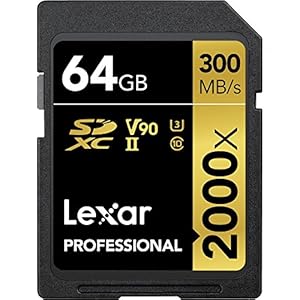
Lexar Professional 2000x SD Card 64GB, SDXC UHS-II Memory Card, Up to 300MB/s Read, for DSLR, Cinema
£72.13 Buy product -

SanDisk Extreme PRO 128GB SDXC Memory Card up to 170MB/s, UHS-1, Class 10, U3, V30
£42.99 Buy product -
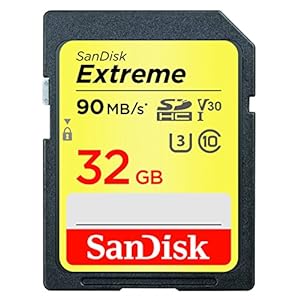
SanDisk Extreme SDSDXVE-032G-GNCIN 32 GB SDHC Class 10 U3 V30 Memory Card , yellow
£11.50 Buy product